
If you’ve ever finished a workout and looked down at your wrist only to see wildly different calorie numbers than your workout buddy’s watch, you’re not alone. Calorie tracking is one of the most searched — and most misunderstood — features of modern wearables. Millions of people rely on their Apple Watch, Fitbit, Garmin, Samsung Galaxy Watch, or Whoop band every day to estimate energy expenditure, but few understand what’s actually happening under the hood.
Calorie tracking sits at the intersection of hardware engineering, physiology, and data science. A smartwatch is essentially running a miniature science experiment on your wrist every second of the day — sampling light reflected off your skin, measuring tiny accelerations of your arm, and feeding all of it into a statistical model trained on population-level fitness data. The result is a single number on your screen that feels precise but is, in reality, an educated estimate.
In this comprehensive guide, we’ll break down exactly how smartwatches track calories burned, which sensors are involved, the science and math behind the algorithms, how accurate (or inaccurate) the numbers really are across different brands and activities, the biggest limitations of the technology, and practical steps you can take to get more reliable results from the device you already own.
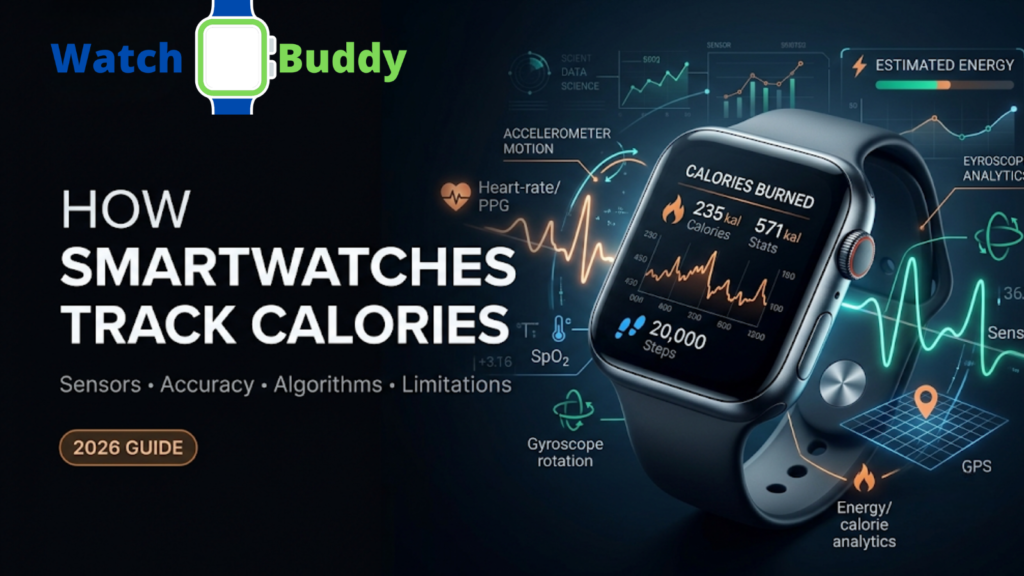
Table of Contents
Why Calorie Tracking Became a Core Smartwatch Feature
Calorie tracking didn’t start as a wearable feature — it began with clinical research tools like metabolic carts and doubly labeled water testing, both of which are expensive, time-consuming, and impractical for everyday use. As pedometers evolved into full-fledged fitness trackers in the early 2010s, brands like Fitbit and Jawbone recognized that consumers wanted a simple, motivating number that summarized their entire day of activity. Calories became that number.
Today, calorie tracking is a headline feature that influences purchasing decisions, closes “activity rings,” and integrates with nutrition apps to help people manage weight. But the underlying technology has always trailed behind the marketing. Understanding the gap between what a smartwatch can measure and what it estimates is the key to using this feature intelligently.
How Smartwatches Track Calories Burned: The Basics
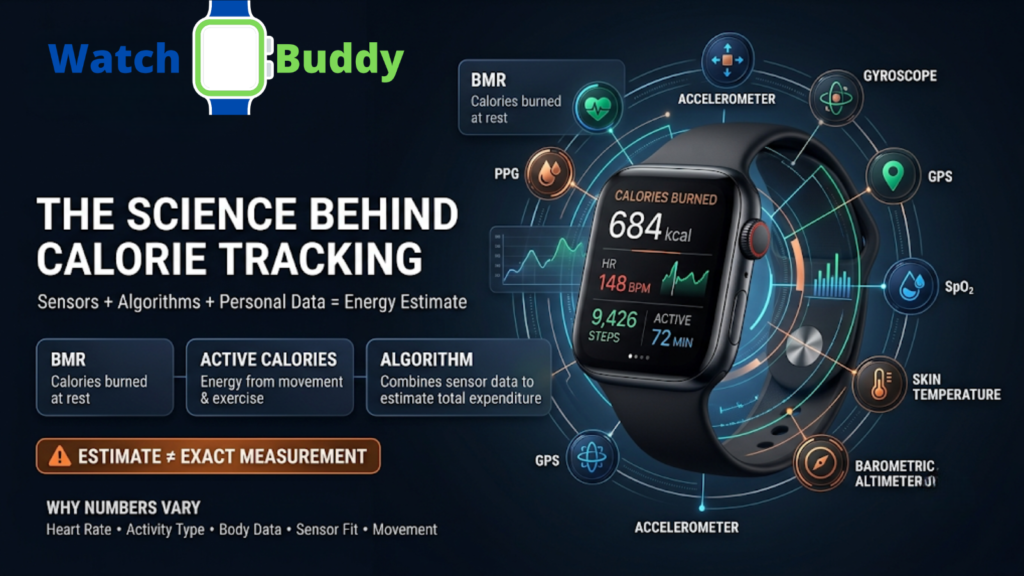
Smartwatches don’t directly measure calories. There is no sensor that detects a “calorie” the way a thermometer detects temperature. Instead, they use a combination of sensors and mathematical models to estimate energy expenditure indirectly. This estimate is built from two main components:
- Basal Metabolic Rate (BMR) — the calories your body burns at rest just to keep your organs functioning, your heart beating, and your brain running. This accounts for roughly 60-75% of most people’s total daily energy expenditure.
- Active Calories — the extra calories burned through movement, exercise, and daily activity, sometimes called the “thermic effect of activity.”
Your smartwatch combines these two numbers, using real-time sensor data, to give you a “Total Calories Burned” figure throughout the day. Some devices also attempt to account for the thermic effect of food (calories burned digesting meals), though this is far less commonly integrated into consumer wearables.
The Key Sensors Behind Calorie Tracking
1. Heart Rate Sensor (PPG – Photoplethysmography)
This is the most important sensor for calorie estimation. Using green LED lights and photodiodes, your watch measures blood flow changes under your skin to calculate heart rate. As your heart works harder, blood volume changes under the sensor become more pronounced, and the watch translates this into beats per minute. Since calorie burn is closely tied to heart rate during exercise, this data feeds directly into the calorie algorithm — higher sustained heart rate typically signals higher energy expenditure.
2. Accelerometer
The accelerometer detects motion — steps, arm swings, and general movement intensity — across three axes (x, y, z). It helps the watch distinguish between sitting still and walking briskly, which significantly changes calorie output. This is also the primary sensor behind step counting and “stand” reminders.
3. Gyroscope
Often paired with the accelerometer, the gyroscope tracks orientation and rotational movement, helping refine activity type recognition (like differentiating a bike ride from a run, or a swim stroke from a paddle motion). Together, the accelerometer and gyroscope form what’s often called an Inertial Measurement Unit (IMU).
4. GPS
For outdoor activities like running or cycling, GPS data on pace, distance, and elevation gain adds context that improves calorie estimates beyond heart rate alone. Elevation gain in particular matters — climbing a hill burns significantly more energy than covering the same distance on flat ground, and GPS-derived elevation data helps the algorithm account for this.
5. SpO2 and Skin Temperature Sensors (Newer Models)
Some advanced smartwatches now incorporate blood oxygen saturation (SpO2) and skin temperature data to refine metabolic estimates, especially during high-intensity workouts where oxygen consumption rises sharply. These additional data streams are part of a broader industry trend toward “sensor fusion.”
6. Barometric Altimeter
Many higher-end watches include a barometric altimeter that measures air pressure changes to calculate elevation more precisely than GPS alone, which further refines calorie estimates for hiking, stair climbing, and trail running.
7. User Input Data
Age, sex, height, weight, and sometimes body fat percentage are entered manually. These are critical because they directly influence BMR calculations — two people with identical heart rates during a workout can burn very different amounts of calories depending on their body composition, muscle mass, and metabolic baseline.
How the Algorithm Puts It All Together
Most brands use proprietary formulas rooted in established fitness science models like the Karvonen formula, METs (Metabolic Equivalent of Task) tables, or VO2 max estimation models, adjusted with machine learning based on millions of anonymized user data points collected across their platforms. In simple terms, the process looks like this:
- Collect raw sensor data — heart rate, motion, GPS, and elevation, sampled multiple times per second
- Classify the activity type — walking, running, cycling, strength training, or “other,” often using on-device machine learning models
- Compare against baseline resting heart rate and personal profile data to normalize the estimate
- Apply a brand-specific algorithm that weighs each data stream according to activity type
- Continuously update the estimate in real time, smoothing out sensor noise and correcting for outliers
- Finalize the total after the workout ends, often producing a slightly different number than what was shown live
This is why the same workout can show different calorie counts on different devices — each brand’s algorithm weighs these data points differently, uses different BMR formulas, and applies different correction factors for activity type. Apple, Garmin, Fitbit (Google), and Samsung all use closed-source, proprietary models, which is part of why third-party accuracy studies exist in the first place — outside researchers are trying to reverse-engineer how close these black-box algorithms get to physiological reality.
The Science Behind Basal Metabolic Rate (BMR) Estimates
BMR calculations typically rely on established population-based equations such as the Mifflin-St Jeor equation or the older Harris-Benedict equation, both of which use age, sex, height, and weight to predict resting energy expenditure. These formulas were developed from studies on specific population samples decades ago, and while they remain reasonably reliable on average, they inherently produce a predicted number rather than a measured one for any individual.
This matters because BMR often makes up the majority of your “calories burned” total on days with light activity. If your smartwatch’s BMR estimate is off by even 5-10%, that error compounds across every hour of the day, well before you’ve even started exercising.
READ MORE How Smartwatches Help Improve Daily Activity: The Complete 2026 Guide
How Accurate Are Smartwatch Calorie Counts?
Here’s the part most people want to know: can you trust the number on your screen?
Multiple independent studies comparing wearables against clinical-grade metabolic carts (the gold standard for measuring calorie burn via oxygen consumption) have found that most consumer smartwatches have an error margin ranging from 10% to 30%, depending on the activity type, brand, and individual physiology. Steady-state cardio (like running or cycling) tends to be tracked more accurately than activities with irregular movement patterns, such as strength training, HIIT, or swimming.
General Accuracy Trends:
- Best accuracy: Walking, running, cycling (steady heart rate patterns, consistent motion)
- Moderate accuracy: Elliptical, rowing, hiking (mixed motion, upper and lower body engagement)
- Lowest accuracy: Weightlifting, HIIT, swimming, yoga (irregular heart rate, complex or minimal motion patterns)
Why the Error Margin Exists
The error isn’t necessarily a flaw in engineering — it reflects the genuine difficulty of estimating a whole-body metabolic process using only wrist-based, non-invasive sensors. Calorie burn depends on muscle mass, efficiency, fitness level, body temperature, and dozens of other variables that a wrist sensor simply cannot directly observe. Brands are optimizing for a reasonable, useful estimate — not laboratory-grade precision — because achieving true accuracy would require equipment far more invasive than a watch.
Limitations of Smartwatch Calorie Tracking
1. Heart Rate Isn’t a Perfect Proxy for Calorie Burn
Heart rate can spike due to stress, caffeine, heat, dehydration, or illness — not just exercise intensity — leading the watch to overestimate calorie burn even when you haven’t moved much.
2. Resistance Training Confuses the Algorithm
Strength training involves short bursts of effort and rest, which most calorie algorithms (designed around cardio) struggle to interpret accurately. A heavy set of squats might barely move your heart rate compared to a light jog, even though it demands significant muscular energy.
3. Skin Tone, Tattoos, and Fit Can Affect Sensor Readings
Optical heart rate sensors rely on light absorption, which can be less accurate on darker skin tones, over tattoos, or when the watch is worn too loosely, too tightly, or in cold conditions that restrict blood flow to the wrist.
4. Inaccurate User Profile Data
If your weight, age, or activity level settings are outdated, your entire calorie calculation baseline shifts, regardless of how good the sensors are. A stale weight entry after significant weight loss or gain is one of the most common — and most overlooked — sources of error.
5. BMR Estimation Errors
Basal metabolic rate formulas are population averages — they don’t account for individual differences like muscle mass, medical conditions, hormonal factors, or genuinely variable metabolic rates between two people of identical age, height, and weight.
6. No Direct Measurement of Fat vs. Muscle Burn
Smartwatches estimate total energy expenditure, not macronutrient breakdown, so they can’t tell you specifically how much fat, carbohydrate, or protein contributed to the calories burned.
7. Motion Without Effort Can Be Misread
Activities like pushing a shopping cart, typing vigorously, or driving on a bumpy road can register as movement, occasionally inflating calorie estimates without meaningful physical exertion.
8. Battery-Saving Modes Reduce Sampling Frequency
Many watches reduce heart rate sampling frequency to preserve battery life during non-workout periods, which can reduce the granularity — and therefore the accuracy — of all-day calorie estimates.
How to Improve Calorie Tracking Accuracy on Your Smartwatch
- Wear it snugly, about a finger’s width above your wrist bone, especially during workouts
- Keep your profile updated (weight, age, height, activity level) every few weeks, especially after significant body composition changes
- Manually log strength workouts instead of relying on auto-detection, so the algorithm doesn’t misclassify the activity
- Calibrate with GPS-based runs when possible for better distance and elevation-based estimates
- Avoid checking calories mid-workout — many watches finalize more accurate totals after the session ends and additional sensor data is processed
- Cross-check with a chest strap heart rate monitor for higher accuracy during intense or irregular sessions
- Enable “always-on” heart rate tracking where available, for more continuous and granular data throughout the day
- Avoid wearing over tattoos or scars on the wrist where possible, or switch wrists if sensor readings seem inconsistent
- Recalibrate stride length for running and walking if your watch allows manual adjustment, especially if you have an unusually long or short stride
Are Some Brands More Accurate Than Others?
Independent accuracy testing generally shows that chest strap heart rate monitors paired with fitness apps outperform wrist-based optical sensors across all brands. Among wrist wearables, devices with multi-sensor fusion (combining heart rate, SpO2, temperature, and motion data) tend to produce more reliable estimates than those relying on heart rate alone. No single brand is perfectly accurate — all wrist-based wearables carry some margin of error compared to lab-grade metabolic testing, and accuracy can vary from one firmware update to the next as brands refine their algorithms.
Rather than chasing the “most accurate” brand, it’s generally more useful to pick a device with a comfortable, secure fit (since fit has an outsized impact on sensor accuracy) and to focus on consistent day-to-day trends rather than the precision of any single reading.
Smartwatch Calories vs. Other Calorie-Tracking Methods
| Method | Accuracy Level | Convenience | Cost |
|---|---|---|---|
| Metabolic Cart (Lab) | Very High | Very Low | High |
| Doubly Labeled Water Test | Very High | Very Low | High |
| Chest Strap HR Monitor + App | Moderate-High | Moderate | Low-Moderate |
| Wrist Smartwatch | Moderate | Very High | Low-Moderate |
| Manual MET-based Calculators | Low-Moderate | High | Free |
This comparison highlights an important trade-off: smartwatches sacrifice some precision for the massive convenience of continuous, effortless, all-day tracking — something no lab test can offer for everyday use.
Conclusion
Understanding how smartwatches track calories burned helps set realistic expectations about the numbers on your wrist. These devices rely on a genuinely impressive combination of optical heart rate sensors, accelerometers, gyroscopes, GPS, and sometimes SpO2 or temperature sensors, all processed through proprietary algorithms built on established metabolic science. That said, they are fundamentally estimation tools, not clinical instruments — and the 10-30% margin of error found across independent studies is a meaningful number to keep in mind before making major health decisions based on a single calorie reading.
The good news is that accuracy improves significantly when you take a few simple steps: keep your profile data current, wear your device snugly and consistently, manually log activities the algorithm struggles with (like strength training), and treat the calorie number as a trend indicator rather than an exact science. Used this way, your smartwatch remains one of the most convenient and motivating tools available for building sustainable fitness habits — even if it will never replace a lab-grade metabolic cart.
Ultimately, the best approach is to use the calorie data your smartwatch provides as one input among several — alongside how you feel, your performance in the gym, your sleep quality, and your body’s response over time — rather than as the single source of truth for your health and fitness journey.
READ MORE How Accurate Are Fitness Trackers? A Science-Backed Guide for 2026